
|
Delete Avidyne Apps before Installing New Versions |
Post Reply 
|
| Author | |
Gary Lutchansky 
Moderator Group 
Joined: 12 Oct 2023 Location: Melbourne, FL Status: Offline Points: 59 |
 Post Options Post Options
 Thanks(2) Thanks(2)
 Quote Reply Quote Reply
 Topic: Delete Avidyne Apps before Installing New Versions Topic: Delete Avidyne Apps before Installing New VersionsPosted: 30 Sep 2025 at 12:10pm |
|
Delete IFD Trainer and IFD100 apps before Installing New Versions of IFD Trainer and IFD100.
An existing forum post details troubleshooting a crash that occurred after installing the new IFD Trainer app: The solution--for now--is to delete the existing IFD Trainer and IFD100 apps from your iPad BEFORE installing the 10.3.2.2 versions. Why does this solve the problem? Each app--IFD Trainer, IFD100 10.3, and IFD100 10.3.2.2--has independent memory and each app also shares data within an App Group. 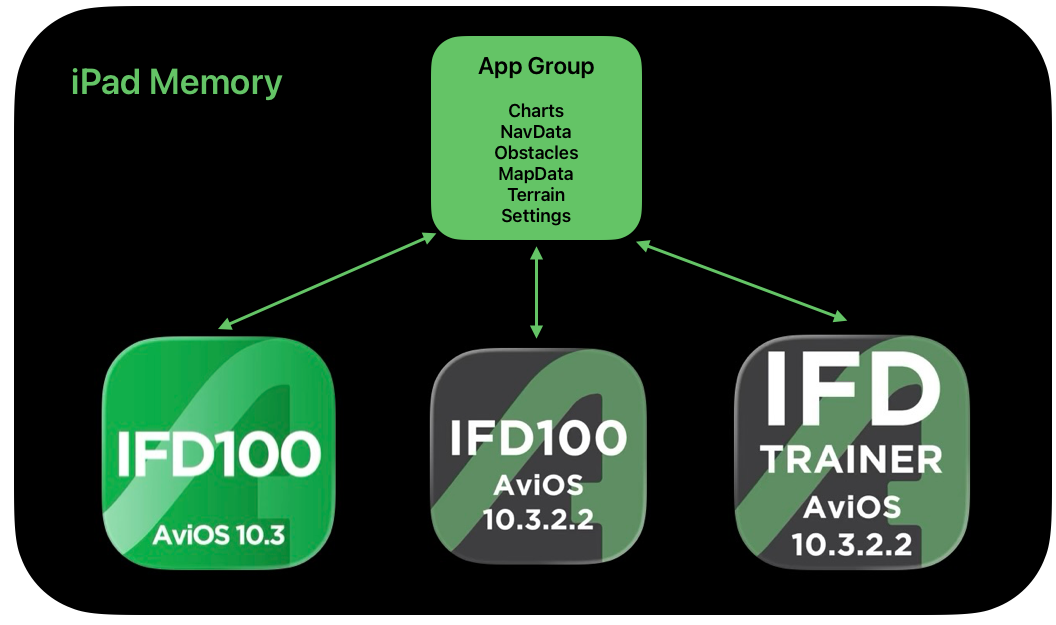 If you download a chart, the chart gets stored in the App Group, and then the chart is immediately available to all the related apps. The App Group also stores common settings used in the apps. The problem occurred because the format for some of these settings differ between app versions. For this reason, the App Group must be removed. Because the App Group remains until the last of the apps that reference the App Group are deleted, all apps must be deleted before installing the new versions. Until this problem is corrected through an app update, the solution is to remove all apps and then install the new versions.
Edited by Gary Lutchansky - 30 Sep 2025 at 12:10pm |
|
 |
|
|
Post Reply
|
|
| Tweet |
| Forum Jump | Forum Permissions You cannot post new topics in this forum You cannot reply to topics in this forum You cannot delete your posts in this forum You cannot edit your posts in this forum You cannot create polls in this forum You cannot vote in polls in this forum |


 Topic Options