
|
Trainer stuck on "Establishing Communications" |
Post Reply 
|
| Author | |
Gary Lutchansky 
Moderator Group 
Joined: 12 Oct 2023 Location: Melbourne, FL Status: Offline Points: 59 |
 Post Options Post Options
 Thanks(0) Thanks(0)
 Quote Reply Quote Reply
 Topic: Trainer stuck on "Establishing Communications" Topic: Trainer stuck on "Establishing Communications"Posted: 24 Sep 2025 at 2:44pm |
|
Per Cardinal Flyer, "Ever since the trainer has been updated to 10.3.2.2, it no longer works on my Mini 5 running iPadOS 26. it starts to initialize and stops at "Establishing Communications", then closes. I have tried uninstalling and reinstalling, but no joy."
Originally posted here: https://www.avidynelive.com/release-10-3-2-2_topic2768_post30128.html#30128
|
|
 |
|
|
Gary Lutchansky
Moderator Group
Joined: 12 Oct 2023 Location: Melbourne, FL Status: Offline Points: 59 |
Post Options
Thanks(0)
Quote Reply
Posted: 24 Sep 2025 at 2:48pm |
|
Cardinal Flyer, sorry that you're experiencing this!
We're going to figure it out. At Avidyne, we've been testing on the alphas/betas of iPadOS 26 since the summer. Also on a variety of iPads across hardware releases and iPadOS versions. To understand the sequencing of the IFD Trainer release and the recent iPadOS 26 release: was IFD Trainer 10.3.2.2 working on your iPad prior to the update to iPadOS 26?
|
|
|
|
|
Gary Lutchansky
Moderator Group
Joined: 12 Oct 2023 Location: Melbourne, FL Status: Offline Points: 59 |
Post Options
Thanks(0)
Quote Reply
Posted: 24 Sep 2025 at 3:21pm |
|
Also, could you share the build information for the IFD Trainer? To get the build information, select Settings in the top menu. At the bottom of the screen, you should see something like:
"IFD Trainer version 2025.7 (build 1) running iPadOS 26.0 for iPad." I ask because, in an early release, an issue was resolved that MIGHT have caused your problem.
Edited by Gary Lutchansky - 24 Sep 2025 at 3:24pm |
|
|
|
|
Cardinal Flyer
Newbie 
Joined: 08 May 2025 Location: Oregon Status: Offline Points: 2 |
Post Options
Thanks(0)
Quote Reply
Posted: 25 Sep 2025 at 10:04am |
|
OK, after a dozen attempts, I managed to get the settings tab to work before the app crashed. It is exactly as you said :
"IFD Trainer version 2025.7 (build 1) running iPadOS 26.0 for iPad." I don't know if the new version worked before because I didn't upgrade it until after the "upgrade" to 26. Here is a link to a video of what is happening:
|
|
|
|
|
Gary Lutchansky
Moderator Group
Joined: 12 Oct 2023 Location: Melbourne, FL Status: Offline Points: 59 |
Post Options
Thanks(0)
Quote Reply
Posted: 25 Sep 2025 at 11:29am |
|
The video helps!
So, on start-up, the IFD screen displays, shows "Establishing Communication...", then the app goes away. Good news/bad news: this behavior does not occur on the many iPads that have been used for testing. We'll be instrumenting the code to see what might trigger the condition you're experiencing. In the meantime, an update to the IFD Trainer has just been released on the App Store. While the "What's New" comment for the release indicates just "Update addresses the display of the App Icon in the App Store," a guard against an error condition was also added. This change was not directed at your situation, but it is possible that your error might be avoided. Please update to 2025.8 to see if the problem is resolved. Thank you! Edited by Gary Lutchansky - 25 Sep 2025 at 11:31am |
|
|
|
|
Cardinal Flyer
Newbie
Joined: 08 May 2025 Location: Oregon Status: Offline Points: 2 |
Post Options
Thanks(0)
Quote Reply
Posted: 25 Sep 2025 at 12:25pm |
|
OK, I updated to build 2, but no improvement. Link below is to the info about my iPad.
https://drive.google.com/file/d/1vMqI1fh9hcySIR7ofhr18c7A8SVxSpuF/view?usp=drivesdk I have updated the permissions for the link. It is now visible to anyone with the link. Edited by Cardinal Flyer - 25 Sep 2025 at 1:36pm |
|
|
|
|
Gary Lutchansky
Moderator Group
Joined: 12 Oct 2023 Location: Melbourne, FL Status: Offline Points: 59 |
Post Options
Thanks(0)
Quote Reply
Posted: 26 Sep 2025 at 10:36am |
|
Because the app successfully starts on iPads here, tracking down your situation is a challenge!
We've looked at the code in search of possibilities. The "Establishing Communication..." message displays until a host IFD is identified. This code includes determining, in the case of two IFDs, which IFD should be the primary IFD. In the case of IFD Trainer, it listens over WiFi a bit to determine if there are any other IFDs. Hearing no other IFDs, your IFD Trainer SHOULD become the host. While the intended functionality is the same, the code for the IFD Trainer and an actual IFD is not identical. The IFD Trainer translates messages to use the iPad WiFi for communications; an actual IFD does this differently. Recommendation 1: Could you try to start the IFD Trainer without WiFi and without Cellular? Whether the IFD Trainer will then start up successfully or not will help with our tracking. Next, Apple provides crash metrics to developers IF users have enabled this possibility. These metrics are anonymized. As developers we have no idea of who was running the app and we don't get any identification information. For the past 2 releases of IFD Trainer--2025.7 and 2025.8--there have been NO IFD Trainer crashes reported. However, we know that your IFD Trainer went belly up. Recommendation 2): If not already, could you enable "Share with App Developers"? This setting can be found in the Settings App > Privacy & Security > Analytics & Improvements > Share with App Developers. With this enabled and a crash under your belt, once the iPad is connected to WiFi and is charging, the crash metric will be pushed to Apple so they can share the results with us. With that information, from the development tool, Xcode, we can open the crash to the function where the crash occurs. This would help dramatically. Thank you!
Edited by Gary Lutchansky - 26 Sep 2025 at 10:40am |
|
|
|
|
Cardinal Flyer
Newbie
Joined: 08 May 2025 Location: Oregon Status: Offline Points: 2 |
Post Options
Thanks(0)
Quote Reply
Posted: 26 Sep 2025 at 4:39pm |
|
OK, I turned off WiFi and Bluetooth (I do not have a cellular plan on this device). Tried to open the app but it crashed. I tried several times, but still no joy. I have enabled the Share with App Developers setting before the crashes and enabled wifi then crashed it one more time, so I hope you get some useful info.
I just started the flying portion for my instrument rating and really need the trainer to set the buttonology of the IFD44O. I'm still trying to get over my old GNS-430W. Thanks for all your help and attention to this problem.
|
|
|
|
|
Gary Lutchansky
Moderator Group
Joined: 12 Oct 2023 Location: Melbourne, FL Status: Offline Points: 59 |
Post Options
Thanks(1)
Quote Reply
Posted: 29 Sep 2025 at 11:08am |
|
Thank you for the tests and for enabling the App Store data exchange. We've got something! Here's what we see.
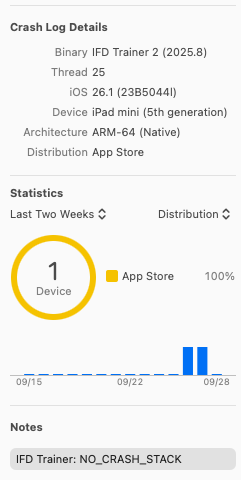 Note that the Device is "iPad mini (5th generation)" running OS 26.1. That matches what you've been using. There are 5 reports, each one from an iPad mini 5th gen. These might all be related to your iPad. Unfortunately, the "NO_CRASH_STACK" leaves very little to look into. For a "good crash", we're able to go to the offending line of code. No such luck here. As we attempt to learn more, there is something else to try from your end. Our IFD Trainer and IFD100 apps share a common stored location on an iPad. Each app gets its own location and each app peers into the shared location. In Apple lingo, the shared location is called an App Group. A typical use of the App Group is to store Jeppesen data so that if data is downloaded from the IFD100, this data is automatically available for use in the IFD Trainer, for example. So here's a thought... I wonder if the shared location has become corrupt. If so, then cleaning the location might be a solution. In order to clean the shared location, the App Group must be deleted. The only way to do this--barring writing new functionality into an app--is to remove all the apps that refer to the App Group. This means deleting IFD Trainer and every IFD100 application on the iPad. And, to be clear, you might have multiple IFD100s on the iPad. Would it be possible for you to try this and then report back? In the meantime, we'll be studying the code more. Edited by Gary Lutchansky - 29 Sep 2025 at 11:27am |
|
|
|
|
Cardinal Flyer
Newbie
Joined: 08 May 2025 Location: Oregon Status: Offline Points: 2 |
Post Options
Thanks(0)
Quote Reply
Posted: 29 Sep 2025 at 11:50am |
|
OK, first I deleted IFD100, then tried the trainer. Same as before, crashed. Next I uninstalled the trainer and reinstalled it. It is now working. Interesting interaction. I am now going to reinstall IFD100 and see if both work.
|
|
|
|
|
Cardinal Flyer
Newbie
Joined: 08 May 2025 Location: Oregon Status: Offline Points: 2 |
Post Options
Thanks(0)
Quote Reply
Posted: 29 Sep 2025 at 11:58am |
|
Both apps are now working! Thank you.
|
|
|
|
|
Gary Lutchansky
Moderator Group
Joined: 12 Oct 2023 Location: Melbourne, FL Status: Offline Points: 59 |
Post Options
Thanks(1)
Quote Reply
Posted: 29 Sep 2025 at 2:12pm |
|
Good that the apps are working well now.
Seems that the existence of a prior installation caused a problem for the latest installation. Until we make app updates to address this, the existing IFD Trainer and IFD100 apps should first be uninstalled before installing the latest releases. Thank you for working through this to determine the issue.
|
|
|
|
|
Cardinal Flyer
Newbie
Joined: 08 May 2025 Location: Oregon Status: Offline Points: 2 |
Post Options
Thanks(0)
Quote Reply
Posted: 04 Nov 2025 at 1:33pm |
|
Well, Trainer is crashing on both my Mini 5 and my Mini 4. I have uninstalled and re installed on both of them. I uninstalled IFD100 from both and only installed Trainer. After new install I download Jeppesen base map and latest navigation data. Restart the app and it shows me at KBED. I change that to KHRI. I start a flight plan to 9S9,but as soon as I enter the 9,the app crashes. After that the app will not get past "Establishing Communication" before crashing.
Mini 4 is non cellular and on iOS 15.8.5. The Mini 5 is cellular and on 26.1.
|
|
|
|
|
Cardinal Flyer
Newbie
Joined: 08 May 2025 Location: Oregon Status: Offline Points: 2 |
Post Options
Thanks(0)
Quote Reply
Posted: 05 Nov 2025 at 4:28pm |
|
Here's a clue. On the Mini 4, I did a factory reset and didn't use my iCloud backup to restore. The only thing that I loaded back was the Trainer app. I didn't sign in to get it the jeppesen databases, rather I just started using the trainer. It worked perfectly. I changed my origin to KHRI and built a FP to 9S9 using the GPS-A approach. Ran the simulator and went missed, then loaded the GPS-8 approach, exited the hold and back down and went missed. Went direct to KHRI and loaded the GPS-A approach and ended up back at KHRI.
So far, so good. I then signed into the jeppesen database page and downloaded the base map and latest nav data. The trainer app now crashes. 😞
|
|
|
|
|
Gary Lutchansky
Moderator Group
Joined: 12 Oct 2023 Location: Melbourne, FL Status: Offline Points: 59 |
Post Options
Thanks(0)
Quote Reply
Posted: 06 Nov 2025 at 8:22am |
|
Okay. On it now. I'll share findings as they occur.
Also, thank you for sending a personal message--I hadn't received an automatic forum announcement and I'm not sure why.
|
|
|
|
|
Cardinal Flyer
Newbie
Joined: 08 May 2025 Location: Oregon Status: Offline Points: 2 |
Post Options
Thanks(0)
Quote Reply
Posted: 06 Nov 2025 at 9:20am |
|
Thanks.
|
|
|
|
|
Cardinal Flyer
Newbie
Joined: 08 May 2025 Location: Oregon Status: Offline Points: 2 |
Post Options
Thanks(0)
Quote Reply
Posted: 11 Nov 2025 at 3:09pm |
Any update? Anything I can do to help you with the troubleshooting?
|
|
|
|
|
Gary Lutchansky
Moderator Group
Joined: 12 Oct 2023 Location: Melbourne, FL Status: Offline Points: 59 |
Post Options
Thanks(0)
Quote Reply
Posted: 13 Nov 2025 at 10:56am |
|
A premonition of upcoming good news! By mimicking your KHRI flight plan procedure using a fresh download of IFD Trainer and later updating to the latest NavData and MapData, we were able to induce a crash during the IFD Trainer’s startup. More to come. |
|
|
|
|
Gary Lutchansky
Moderator Group
Joined: 12 Oct 2023 Location: Melbourne, FL Status: Offline Points: 59 |
Post Options
Thanks(0)
Quote Reply
Posted: 13 Nov 2025 at 12:45pm |
|
Within the MapData, either our processing of the power lines or the format of the power lines is the problem. Still debugging this.
In the meantime, you could load the IFD100, Log in to the Jeppesen page, and delete the MapData file. After this the IFD Trainer should be able to load properly with the demo MapData file.
|
|
|
|
|
Cardinal Flyer
Newbie
Joined: 08 May 2025 Location: Oregon Status: Offline Points: 2 |
Post Options
Thanks(0)
Quote Reply
Posted: 13 Nov 2025 at 1:10pm |
|
|
|
|
|
Cardinal Flyer
Newbie
Joined: 08 May 2025 Location: Oregon Status: Offline Points: 2 |
Post Options
Thanks(0)
Quote Reply
Posted: 14 Nov 2025 at 12:09pm |
|
|
|
|
|
Post Reply
|
|
| Tweet |
| Forum Jump | Forum Permissions You cannot post new topics in this forum You cannot reply to topics in this forum You cannot delete your posts in this forum You cannot edit your posts in this forum You cannot create polls in this forum You cannot vote in polls in this forum |


 Topic Options
 Gary Lutchansky wrote: